Codebase térkép
A lenti blokk egy explorer jellegű, mappastruktúra nézet. Ezzel gyorsan meg tudod találni, hogy a Live Editor melyik funkciója melyik fájlban van.
Codebase Explorer
VS Code jellegu fa nezet a fo Live Editor modulokkal- DIRstorefront/
- DIRpackages/live-editor-overlay/src/overlay package root
- DIRadapters/
- TSlive-editor-overlay-adapter.ts
- DIRcomponents/
- TSXlive-editor-overlay-root.tsxmain orchestrator entry
- DIRlive-editor-overlay-root-modules/
- DIRdragging/
- TSengine/layout-target-helpers.ts
- TShooks/use-section-reorder-drag.ts
- TShooks/use-section-reorder-session.ts
- TSstate/section-reorder-state.ts
- TSXui/live-editor-core-interaction-ui.tsx
- DIRediting/
- TShooks/use-widget-insertion-domain.ts
- TShooks/use-codex-targeting-domain.ts
- TShooks/use-update-publish-pipeline.ts
- TShooks/use-widget-pointer-badge.ts
- TSengine/widget-insertion-targets.ts
- DIRhovering/
- TSengine/hover-target-resolver.ts
- TShooks/use-hover-control-sync-state.ts
- DIRpanels/
- TShooks/use-section-controls.ts
- TShooks/use-structure-mutation-domain.ts
- TShooks/use-structure-navigator-sections.ts
- TShooks/use-section-dom-operations.ts
- DIRorchestration/
- TSeffects/boot/use-editor-bootstrap-effects.ts
- TSeffects/data/use-site-data-effects.ts
- TSeffects/runtime/use-runtime-lifecycle-effects.ts
- TShooks/use-overlay-view-props.ts
- TShooks/use-site-content-management.ts
- TSevents/use-overlay-interaction-events.ts
- TSstate/site-template-documents.ts
- TSstate/use-overlay-root-state-buckets.ts
- TSXui/live-editor-overlay-shell.tsx
- DIRselection/
- TSengine/selection-metadata.ts
- TShooks/use-selection-action.ts
- TSXui/live-editor-selection-panel-shell.tsx
- DIRshared/
- TScontracts/live-editor-overlay-root-types.ts
- TSutils/lookup-index.ts
- TSutils/runtime-log-utils.ts
- TSXui/live-editor-startup-skeleton.tsx
- DIRstrategy/
- MDREADME.md
- MDEFFECTS-PLAN.md
- DIRwidgets/
- TSXcontrols/live-editor-column-controls.tsx
- TSXcreation/live-editor-section-create-dock.tsx
- TSXpanels/live-editor-selection-panel.tsx
- DIRelements-panel/
- TSXtabs/elements-panel-codex-tab.tsx
- TShooks/overlay/use-overlay-panel-data.ts
- CSSstyles/live-editor-globals.cssglobal overlay skin
- TSutils/dom/dom-markers.ts
- DIRsrc/modules/live-editor/
- TSXrenderer/site-document-renderer.tsxpublished page rendering
- TSregistry/component-registry.ts
- TSregistry/types.ts
- DIRsrc/app/api/
- DIRadmin/live-editor/
- TSpages/route.ts
- TSpages/[pageId]/publish/route.ts
- TSsite-settings/route.ts
- TSdb-query/route.ts
- TSruntime-log/route.ts
- DIRlive-editor/
- TSpages/[slug]/route.ts
- TSstatic-blocks/route.ts
- TSwidget-catalog/route.ts
- DIRdb/
- SQLmigrations/20260216_live_editor_structured_content_model.sql
- SQLseed/001_live_editor_seed.sql
Hol mit szerkessz
- Új overlay panel viselkedés
packages/live-editor-overlay/src/components/live-editor-overlay-root-modules/panels/ - Section drag/drop és sorrend módosítás
packages/live-editor-overlay/src/components/live-editor-overlay-root-modules/dragging/ - Szöveg / widget szerkesztés és publish pipeline
packages/live-editor-overlay/src/components/live-editor-overlay-root-modules/editing/ - Statikus blokk mentes + kijelolt elem torles
packages/live-editor-overlay/src/components/live-editor-overlay-root-modules/panels/hooks/use-structure-mutation-domain.ts - Jobb oldali elemek panel vagy widget kontroll UI
packages/live-editor-overlay/src/components/widgets/ + components/elements-panel/ - Storefront publikált oldal render
src/modules/live-editor/renderer/site-document-renderer.tsx - Admin + public Live Editor API végpont
src/app/api/admin/live-editor/ és src/app/api/live-editor/
Mappa referencia
A tábla helyett itt kártya alapú, csoportosított nézetet kapsz: könnyebben átlátod, mire való egy mappa és mikor nyúlj hozzá.
Human-Friendly Folder Guide
Ne utvonalakat kelljen fejben tartanod. Itt minden fontos resznel gyorsan latod: mire valo, az editorban hol jelenik meg, es melyik fajlokhoz nyulj legelso lepesben.
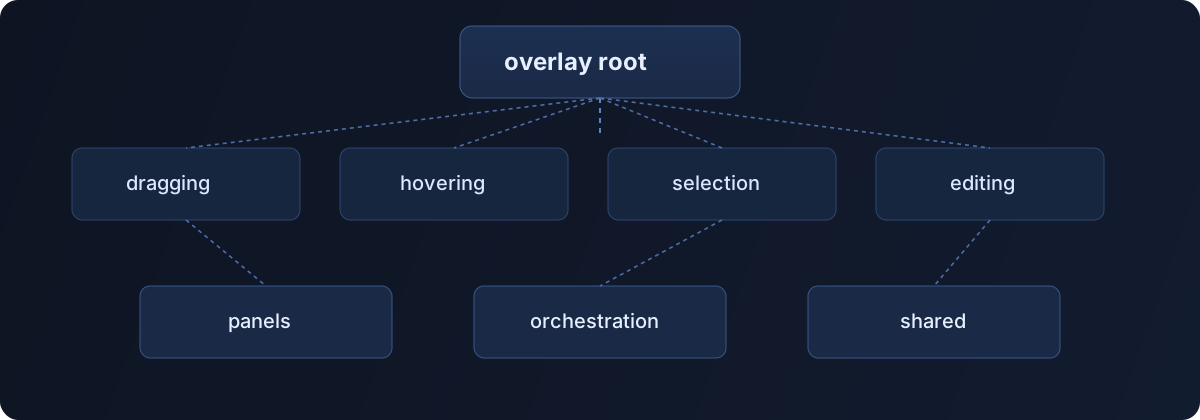
Overlay Core Modules
8 elemAz overlay root alatt ezek a legfontosabb domain modulok. Mindegyik kartyan kulon latod: mit csinal, az editorban hol latszik, mikor nyulj hozza, es a code szekcioban a tipikus belepesi mintat.
dragging
interactionpackages/live-editor-overlay/src/components/live-editor-overlay-root-modules/dragging
Mit csinal
Section es blokk drag/drop logika, reorder allapot es huzas alatti vizualis jelzesek.
Az editorban hol latszik
A canvasban ezt latod a section move drag alatt: ghost, drop preview, reorder placement.
Mikor nyulj hozza
Akkor modositod, ha drop target pontossagot, ghost preview-t, reorder szabalyokat vagy auto-scrollt javitasz.
Kezdesnek nezd meg
hooks/use-section-reorder-drag.tsstate/section-reorder-state.tsui/live-editor-core-interaction-ui.tsx
Code szekcio
1const placement = resolveSectionDropPlacement(pointerPoint)2setSectionDropPreview(placement.element, placement.position)3registerImmediateStructureHistorySnapshot()4scheduleApply()editing
domainpackages/live-editor-overlay/src/components/live-editor-overlay-root-modules/editing
Mit csinal
Szerkesztesi domain: widget insert/update, tipografia, draft allapot, publish pipeline.
Az editorban hol latszik
A jobb panel drag/drop, inline content edit, es a Frissites/Publish folyamata innen fut.
Mikor nyulj hozza
Ha uj szerkesztesi akciot vezetsz be, mentesi/publish folyamatot valtoztatsz, vagy Codex targetinget fejlesztesz.
Kezdesnek nezd meg
hooks/use-widget-insertion-domain.tshooks/use-widget-pointer-badge.tshooks/use-update-publish-pipeline.ts
Code szekcio
1onInsertWidgetByAction({ actionKey, label, target })2setNotice(`Huzd a(z) ${label} elemet a kivant poziciora.`)3registerImmediateStructureHistorySnapshot()4scheduleApply()hovering
interactionpackages/live-editor-overlay/src/components/live-editor-overlay-root-modules/hovering
Mit csinal
Hover target feloldas, hover sync allapot es hover-based affordanceek.
Az editorban hol latszik
Az eger mozgasakor aktiv felulet keretezes es section control trigger ettol fugg.
Mikor nyulj hozza
Ha hover kijeloles pontatlan, vagy uj hover highlight / target viselkedest szeretnel.
Kezdesnek nezd meg
engine/hover-target-resolver.tshooks/use-hover-control-sync-state.ts
Code szekcio
1const hoverTarget = resolveSectionHoverTargetFromElement(node)2setHoverControlSyncState((prev) => ({ ...prev, target: hoverTarget }))selection
statepackages/live-editor-overlay/src/components/live-editor-overlay-root-modules/selection
Mit csinal
Aktiv kijeloles allapot, selection metadata, keyboard es pointer actionok.
Az editorban hol latszik
A kijelolt elemhez tartozo inline panel, action gombok es focus ugyintezes itt dol el.
Mikor nyulj hozza
Ha valtozik, mi legyen kijelolt, hogyan lepjen focus, vagy hogyan nyisson a selection panel.
Kezdesnek nezd meg
engine/selection-metadata.tshooks/use-selection-action.tsui/live-editor-selection-panel-shell.tsx
Code szekcio
1setSelection({ key, keys, source: "dom" })2setPanelPosition(getPanelPositionForRect(anchorRect))3setShowTypography(false)panels
ui-domainpackages/live-editor-overlay/src/components/live-editor-overlay-root-modules/panels
Mit csinal
Panel domain logika: section controls, header builder, workspace es panel adatszallitas.
Az editorban hol latszik
Section panel nyitas/zaras, structure navigator, es static block save/delete mutaciok ide tartoznak.
Mikor nyulj hozza
Ha panel viselkedest, panelbol inditott muveletet vagy panel adatszerkezetet modositasz.
Kezdesnek nezd meg
hooks/use-section-controls.tshooks/use-structure-navigator-sections.tshooks/use-structure-mutation-domain.ts
Code szekcio
1showSectionSpacingControlForElement(target, { force: true })2setSectionSpacingPanelPosition(getSectionSpacingPanelPositionForElement(target))3onSaveStaticBlockTemplate()orchestration
runtimepackages/live-editor-overlay/src/components/live-editor-overlay-root-modules/orchestration
Mit csinal
Startup flow, global eventek, modulok kozti osszekotes es runtime state.
Az editorban hol latszik
Indulas utan marker apply, site-data sync, overlay event wiring es watchdog innen vezerelt.
Mikor nyulj hozza
Ha init sorrend, global listener, watchdog vagy cross-module adatfolyam valtozik.
Kezdesnek nezd meg
hooks/use-site-content-management.tsevents/use-overlay-interaction-events.tsstate/use-overlay-root-state-buckets.ts
Code szekcio
1useStartupState(runtimeInput)2useDomMarkerPipeline(markerPipelineInput)3useOverlayInteractionEvents(interactionEventInput)shared
foundationpackages/live-editor-overlay/src/components/live-editor-overlay-root-modules/shared
Mit csinal
Kozos contractok, tipusok, utilityk es shared UI elemek tobb modulnak.
Az editorban hol latszik
Ha tobb modul ugyanazt a state shape-et, utilt vagy konstans keszletet hasznalja, az itt kozositett.
Mikor nyulj hozza
Ha ugyanazt a logikat tobb modulban hasznalnatok, vagy uj kozos tipus/util kell.
Kezdesnek nezd meg
contracts/live-editor-overlay-root-types.tsutils/lookup-index.tsui/live-editor-startup-skeleton.tsx
Code szekcio
1export type SelectionIdentity = {2 key: string3 source: SelectionSourceKind4}strategy
docspackages/live-editor-overlay/src/components/live-editor-overlay-root-modules/strategy
Mit csinal
Refaktor board, domain taskok es implementacios strategia dokumentacio.
Az editorban hol latszik
Kozvetlen runtime hatasa nincs, de ez adja a refaktor prioritasi sorrendet es regresszio checklistet.
Mikor nyulj hozza
Ha uj task cardot nyitsz, board statuszt frissitesz vagy roadmapet dokumentalsz.
Kezdesnek nezd meg
README.md00-BOARD.md
Code szekcio
1## Open2- [ ] TASK-06 Root state buckets and props builder split3- [ ] TASK-07 Final orchestrator trim + regression hardeningUI Layers
3 elemEzek a modulok inkabb vizualis komponensek: widget kontrollok, panel tabok, toolbar es global visszajelzesek.
widgets
uipackages/live-editor-overlay/src/components/widgets
Mit csinal
Widget-specifikus UI: controls, creation dock, media panel, selection panel.
Az editorban hol latszik
A felhasznalo altal latott widget gombok, panel mezok es kontrollok tobbsege innen jon.
Mikor nyulj hozza
Ha egy konkret widget UI-jat vagy widget panel kontrolljait modositanad.
Kezdesnek nezd meg
controls/live-editor-column-controls.tsxcreation/live-editor-section-create-dock.tsx
elements-panel
uipackages/live-editor-overlay/src/components/elements-panel
Mit csinal
Jobb oldali elemek panel tabjai es panel content strukturaja.
Az editorban hol latszik
A jobb oldali panel tabok, keresok es katalogus listak itt epulnek.
Mikor nyulj hozza
Ha uj tabot adsz hozza, tab sorrendet valtoztatsz, vagy tab tartalmat csinalsz.
Kezdesnek nezd meg
tabs/elements-panel-tabs.tsxtabs/elements-panel-codex-tab.tsx
globals
uipackages/live-editor-overlay/src/components/globals
Mit csinal
Global UI elemek: toolbar, notice, confirm dialog, debug hud.
Az editorban hol latszik
Az editor-wide toolbar es notice visszajelzesek miatt ez az egyik leglathatobb UI layer.
Mikor nyulj hozza
Ha editor-wide vizualis elem, toast, dialog vagy toolbar behavior valtozik.
Kezdesnek nezd meg
panels/live-editor-toolbar.tsxfeedback/live-editor-notice-toast.tsx
Storefront + API + Data
5 elemA render oldal, API route-ok es adatbazis migraciok egyutt adjak a Live Editor perzisztens, publikalhato hatteret.
renderer
storefrontsrc/modules/live-editor/renderer
Mit csinal
Publikalt site dokumentum kirenderelese a storefront oldalon.
Az editorban hol latszik
A publish utan ezt a renderert latja a latogato; itt derul ki, hogy a dokumentum strukturaja helyes-e.
Mikor nyulj hozza
Ha blokk megjelenes, fallback layout vagy storefront oldali blokk viselkedes valtozik.
Kezdesnek nezd meg
site-document-renderer.tsx
registry
schemasrc/modules/live-editor/registry
Mit csinal
Blokk tipusregiszter es a dokumentum shape tipusdefinicioi.
Az editorban hol latszik
Uj blokk tipust csak akkor tudsz vegigvinni, ha a registry oldalon is felveszed.
Mikor nyulj hozza
Ha uj blokk tipust vezetsz be, vagy props schema/tipus modositast csinalsz.
Kezdesnek nezd meg
component-registry.tstypes.ts
admin live-editor api
backendsrc/app/api/admin/live-editor
Mit csinal
Admin mentes, publish, db query, site settings es jogosultsag ellenorzes vegpontok.
Az editorban hol latszik
A szerkeszto mentes/publish gombjai ezeket hivjak, igy itt dol el a perzisztencia sikeressege.
Mikor nyulj hozza
Ha mentesi/publish backend flow, auth szabaly vagy admin response shape valtozik.
Kezdesnek nezd meg
pages/route.tspages/[pageId]/publish/route.tsdb-query/route.ts
public live-editor api
backendsrc/app/api/live-editor
Mit csinal
Public tartalom-lekeres endpointok runtime rendereleshez.
Az editorban hol latszik
A storefront itt keri le a publikalt oldalt, locale es slug feloldassal.
Mikor nyulj hozza
Ha storefront tartalom endpoint cache, locale feloldas vagy output valtozik.
Kezdesnek nezd meg
pages/[slug]/route.tswidget-catalog/route.ts
migrations + seed
databasedb/migrations + db/seed
Mit csinal
Live Editor schema es indulasi adatok.
Az editorban hol latszik
A strukturalt section/column/widget relaciot ezek a migraciok hozzak letre.
Mikor nyulj hozza
Ha uj tablat/oszlopot/constraintet vezetsz be vagy fejlesztoi seed adatra van szukseg.
Kezdesnek nezd meg
migrations/20260216_live_editor_structured_content_model.sqlseed/001_live_editor_seed.sql
Adatmodell
A tartalom verziózott és párhuzamosan JSON + relációs (section/column/widget) reprezentációban is elérhető. A relációs fa automatikusan szinkronizál a page_versions.document mezőből.
| Tábla | Feladat |
|---|---|
live_editor.pages | Oldal azonosítás slug + locale alapján |
live_editor.page_versions | Draft / published verziók és dokumentum snapshot |
live_editor.page_version_sections | Normalizált section szint |
live_editor.page_version_columns | Sectionön belüli oszlopok |
live_editor.page_version_widgets | Widgetek + katalógus reláció |
Kapcsolódó migrációk a db/migrations/ mappában vannak, seed adatok pedig a db/seed/ könyvtárban.
API végpontok
A jelenlegi flowban ezek a fő végpontok:
1GET /api/admin/live-editor/pages2GET /api/admin/live-editor/pages?slug=<slug>&locale=<hu|sk>3POST /api/admin/live-editor/pages4POST /api/admin/live-editor/pages/:pageId/publish5GET /api/live-editor/pages/:slug?locale=<hu|sk>A dokumentum szerkezet v2 shape-et használ: version, rows, columns, blocks.
Debug és hibakeresés
Beépített fejlesztői oldalak:
/{countryCode}/dev-live-editor-db- gyors SQL parancsok/{countryCode}/dev-live-editor-db-view- relációs vizualizáció
Ha oldal nem renderel, ellenőrizd a slug/locale párost, valamint hogy van-e publikált verzió az adott oldalhoz.